
Department-Based Authorization Guide
In small and medium-sized enterprises (SMEs), measuring the productivity of employees working either in the office or remotely is of critical importance for company profitability. The new generation cloud-based employee tracking and computer monitoring software, BossEye, not only offers businesses the opportunity to monitor their employees but also provides a secure audit infrastructure suitable for the company hierarchy with its Advanced Department and Authorization Management.
In this article, we examine step-by-step how to define a group-specific manager (sub-user) via the BossEye panel and the advantages this feature will add to your business.
What is Department-Based Computer Tracking?
The working dynamics and goals of each department are different. The workflow of an accounting department cannot have the same programs, productivity metrics, and shift schedules as a call center or software team.
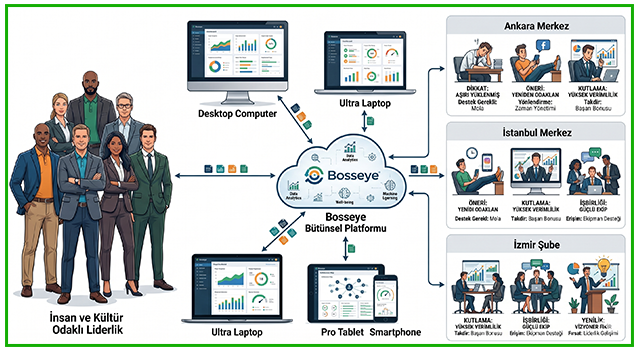
Thanks to BossEye's group management system, you can separate the devices in your business by departments, locations, or branches. The Group-Specific Manager Definition feature allows you to assign only the team leaders or managers responsible for that team to these sub-groups you have created. Thus, a department manager can only live monitor the screens, review past records, and access the productivity reports of the employees in their own group.
Step by Step: How to Assign a Group-Specific Manager in BossEye?
Integrating your business's organizational chart into the BossEye system is a very simple and fast process. With the flexibility of unlimited group creation and sub-user definition, you can complete your authorizations by following the steps below:
Creating Groups (Departments)
First, log in to your BossEye admin panel.
- Click on the Groups (or Group Management) tab from the menu.
- Name your departments (e.g., Accounting, Human Resources, Izmir Branch) by clicking the "Create New Group" button. (You can also create nested sub-groups according to your needs).
Assigning Devices to Groups
Distribute the connected employee computers to the relevant departments. You can perform bulk device moving operations in seconds using the multiple selection feature.
Opening a Sub-User (Manager) Profile
As the company owner or main system administrator (Root), you must create system login accounts for your sub-managers.
- Go to the Users / Managers tab.
- Click on "Add New Manager" and enter the relevant department manager's name, surname, and email information.
Authorizing the Manager for the Relevant Group
The final and most important stage is authorization restriction.
- Enter the profile settings of the sub-user you created.
- From the Authorized Groups section, check the groups (departments or branches) you want the manager to see.
- Save the process.
Now, when the relevant manager logs into the BossEye system with their own credentials, they will only be able to see the computers, productivity reports, and screen recordings in the group assigned to them, rather than all the computers of your company.
Advantages of Group-Specific Authorization for Businesses
Distributing the workload to department leaders by defining sub-managers provides serious operational benefits to businesses:
- Workload Distribution and Time Saving: Instead of one person supervising all staff, reporting and tracking processes are delegated to department leaders. Fast action is taken.
- High-Level Data Security: Access to the screens of critical units such as accounting by other department managers is prevented. In-company data privacy is protected.
- Focused Performance Analysis: The manager only sees the analysis reports of their own team. They focus solely on the productivity of "their own team" without getting lost among crowded data.
- Scalability: When a new branch or department is opened, a new group and manager are created and included in the system in seconds without disrupting the main structure.
In Summary
Can an employer install remote monitoring software on an employee's computer?
As your number of staff increases, it becomes difficult to manage monitoring and evaluation processes from a single source. BossEye computer tracking program copies the hierarchical structure of your business directly to the digital environment with its department-based group creation and group-specific manager assignment capabilities. Managing your teams from anywhere with affordable costs and high security will directly increase the overall productivity of your company.
Since Bosseye is a cloud-based software, you can easily monitor the screens live from the management screens on any PC, tablet, or mobile phone with a browser. You can use our software completely free for 3 days.
Start your free trial right now